



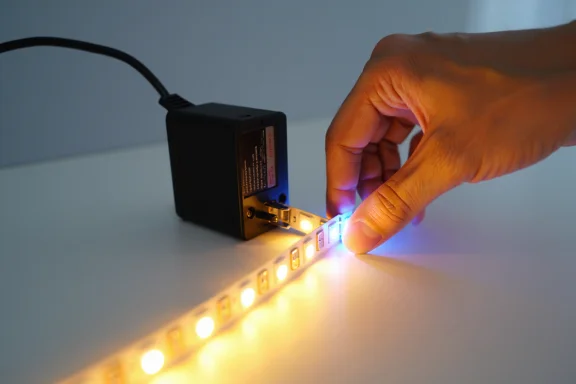
Power outages can disrupt many electronic systems inside a home, including LED lighting. While LED lights are known for their energy efficiency, durability, and long lifespan, sudden power interruptions can sometimes cause temporary malfunctions or connectivity issues. After electricity is restored, homeowners may notice that certain LED lights begin flickering, fail to turn on correctly, lose smart settings, display incorrect colors, or stop responding to remotes and apps.
These problems are especially common with:
- Smart LED bulbs
- LED strip lights
- Color-changing RGB systems
- App-controlled lighting
- Remote-operated fixtures
Fortunately, most of these issues can be fixed with a simple reset process. In many cases, resetting LED lights after a power outage restores normal functionality without requiring replacement parts or professional repairs.
Understanding how to safely reset LED lights can help homeowners quickly solve common lighting problems while protecting their lighting systems from further issues.
This guide explains how to reset LED lights after a power outage, along with troubleshooting tips and maintenance practices that help improve lighting performance.
Why Power Outages Affect LED Lights
LED lights contain electronic drivers and internal circuitry that regulate:
- Brightness
- Power flow
- Color settings
- Smart connectivity
- Remote communication
When a sudden power outage occurs, voltage fluctuations or abrupt shutdowns may temporarily disrupt these systems.
After power returns, LED lights may:
- Lose synchronization
- Freeze on certain settings
- Disconnect from smart home systems
- Fail to respond properly
Resetting the system often clears these temporary errors.
Common LED Problems After a Power Outage
Several lighting issues may appear after electricity is restored.
Common problems include:
- Flickering lights
- Flashing LED strips
- Incorrect colors
- Unresponsive remotes
- Smart app disconnection
- Partial illumination
- Lights not turning on
Most of these issues are usually temporary and can often be fixed with simple troubleshooting.
Safety Tips Before Resetting LED Lights
Before handling any lighting system, safety should always come first.
Important precautions include:
- Turn off power before inspecting wiring
- Avoid touching exposed electrical connections
- Keep hands dry
- Use compatible power supplies
If there are signs of electrical damage such as burning smells or sparks, professional assistance may be necessary.
Basic LED Light Reset Method
A standard power reset is often the quickest solution after a power outage.
Step 1: Turn Off the Lights
Switch off the LED lights completely using:
- Wall switches
- Remote controls
- Smart apps
This helps stop any unstable power flow.
Step 2: Disconnect the Power Supply
Unplug the LED lights or disconnect the power source if possible.
Wait approximately:
- 15 to 30 seconds
This allows the internal system to fully shut down and reset.
Step 3: Reconnect the Power
Reconnect the power supply securely.
Check:
- Power adapters
- Controller cables
- Plug connections
Loose connections can sometimes cause additional issues.
Step 4: Turn the Lights Back On
Restore power and test the lights.
In many cases, normal operation returns immediately after this process.
Resetting Smart LED Bulbs After a Power Outage
Smart LED bulbs are especially sensitive to connectivity interruptions.
After a power outage, they may:
- Disconnect from Wi-Fi
- Fail to respond in apps
- Lose automation settings
Common Smart Bulb Reset Method
Most smart bulbs can be reset by:
- Turning the bulb on and off repeatedly in a specific sequence
- Waiting for the bulb to flash or blink
The blinking usually confirms the reset was successful.
Different brands may use slightly different reset patterns.
How to Reset LED Strip Lights
LED strip lights may experience:
- Flashing
- Color synchronization problems
- Controller issues
after a power interruption.
Quick LED Strip Reset
- Turn off the strip lights
- Disconnect power
- Wait 20 seconds
- Reconnect power
- Hold the controller reset button if available
Some RGB systems may flash multiple colors during the reset process.
Resetting Remote-Controlled LED Lights
Remote-controlled systems may lose pairing after a power outage.
Remote Reset Steps
- Turn off the lights
- Remove batteries from the remote briefly
- Restore power to the lighting system
- Reinsert batteries
- Press the pairing or power button
This often restores communication between the remote and the LED controller.
Reconnecting App-Controlled LED Systems
Smart LED lights connected to mobile apps may require reconnection after an outage.
Basic App Troubleshooting
- Restart the mobile app
- Check Wi-Fi stability
- Reset the LED lights
- Re-add the device through the app
Stable internet connectivity is essential for smart lighting systems.
Troubleshooting Persistent LED Problems
If resetting does not solve the issue, additional troubleshooting may help.
Inspect the Power Supply
Power surges during outages can sometimes affect adapters or drivers.
Signs of power supply issues include:
- Flickering
- Dimming
- Random shutdowns
Using the correct voltage and wattage is important.
Check for Loose Connections
Loose connectors may interrupt LED performance.
Inspect:
- Power cables
- Strip connectors
- Controller wires
- Plug adapters
Secure connections improve stability.
Test the LED Controller
Many LED systems use separate controller units.
A damaged controller may cause:
- Flashing
- Color errors
- Remote failures
Replacing the controller may solve ongoing problems.
Why Voltage Fluctuations Affect LEDs
Power outages are often accompanied by:
- Voltage spikes
- Sudden power surges
- Inconsistent electrical flow
These fluctuations can temporarily confuse LED drivers and smart controllers.
Surge protectors may help reduce future risks.
Using Surge Protection for LED Lights
Surge protectors help shield electronics from sudden voltage changes.
They are especially useful for:
- Smart bulbs
- RGB lighting systems
- Expensive LED installations
- Home automation setups
Protection devices may extend the lifespan of LED equipment.
Common Mistakes to Avoid
Some troubleshooting mistakes can worsen LED issues.
Avoid:
- Rapidly unplugging and reconnecting lights repeatedly
- Using incompatible power supplies
- Pulling cables forcefully
- Ignoring damaged wiring
Careful handling protects the lighting system.
Benefits of Resetting LED Lights Properly
Proper reset procedures help:
- Restore lighting performance
- Reconnect smart controls
- Correct color synchronization
- Improve system responsiveness
A reset is often the fastest solution after a power outage.
When Professional Help Is Necessary
Some situations may require professional electrical assistance.
Call a qualified electrician if:
- Breakers continue tripping
- Wiring appears damaged
- Lights spark or overheat
- Burning smells are present
Electrical safety should always be the top priority.
Maintaining LED Lights After Power Interruptions
Regular maintenance helps reduce future lighting issues.
Helpful maintenance practices include:
- Using surge protectors
- Keeping connectors clean
- Avoiding overloaded circuits
- Using compatible accessories
Proper installation also improves long-term reliability.
Final Thoughts
Learning how to reset LED lights after a power outage can help homeowners quickly restore normal lighting performance and solve common issues caused by electrical interruptions. Whether dealing with smart bulbs, LED strips, RGB systems, or remote-controlled fixtures, simple reset procedures often correct temporary glitches within minutes.
By following safe troubleshooting steps and maintaining stable power connections, homeowners can keep their LED lighting systems operating efficiently and reliably even after unexpected power outages.